网站建设HaloHalo博客搭建与Halo-theme-Hao主题的使用与优化
顾拾柒
本教程是修改的主题是Halo-theme-Hao 版本是:1.6.6
根据友联页面修改而来。
原理是添加链接,给分组添加一个自定义属性,通过属性过滤展示的链接
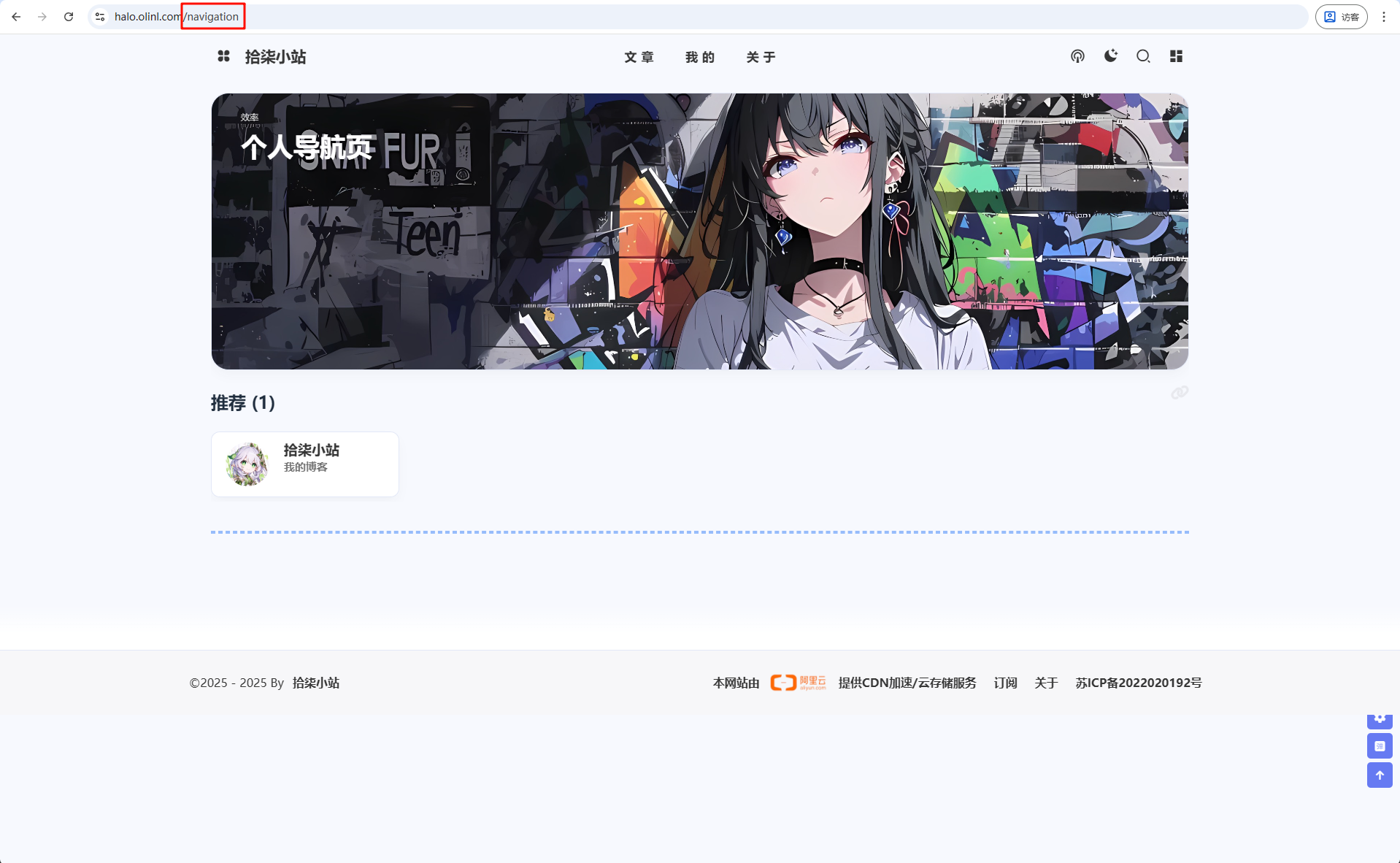
效果如图:

下面就开始教程吧!
修改Halo运行配置
在运行时会缓存模板文件,下次访问不再会读取物理的模板文件,这会有性能的损耗。
如果我们修改主题,可以添加一个运行参数
搭建开发环境
1
2
| # 关闭主题模板缓存
- --spring.thymeleaf.cache=false
|
创建navigation模板页面
首先先找到主题文件夹:在持久化存储的halo2文件夹下的themes/theme-hao里面
1、修改theme.yaml配置
找到spec.customTemplates.page添加一个导航页面模板:
1
2
3
4
5
6
7
8
9
10
11
12
13
14
15
16
| spec:
displayName: Hao
author:
name: 程序员小航 & 困困鱼 & Carol
website: https://github.com/chengzhongxue
customTemplates:
page:
- name: 友情链接页面模版
description: 支持可预设文本的友链
screenshot:
file: page_links.html
- name: 导航页面模板
description: 个人导航页
screenshot:
file: navigation.html
|
2、添加navigation.html
在templates目录下新建一个文件navigation.html
添加如下内容:
1
2
3
4
5
6
7
8
9
10
11
12
13
14
15
16
17
18
19
20
21
22
23
24
25
26
27
28
29
30
31
32
33
34
35
36
37
| <!DOCTYPE html>
<html xmlns:th="http://www.thymeleaf.org"
th:replace="~{modules/layouts/layout :: layout(content = ~{::content}, htmlType = 'page',title = ${singlePage.spec.title + ' | ' + site.title}, head = ~{::head})}">
<th:block th:fragment="head">
<th:block th:replace="~{modules/common/open-graph :: open-graph(_title = ${singlePage.spec.title},
_permalink = ${singlePage.status.permalink},
_cover = ${singlePage.spec.cover},
_excerpt = ${singlePage.status.excerpt},
_type = 'website')}"></th:block>
</th:block>
<th:block th:fragment="content">
<div class="page" id="body-wrap">
<header class="not-top-img" id="page-header">
<nav th:replace="~{modules/nav :: nav(title = ${singlePage.spec.title})}"></nav>
<link rel="stylesheet" type="text/css" th:href="${assets_link + '/libs/fcircle/heo-fcircle3.css'}">
</header>
<main class="layout hide-aside" id="content-inner">
<div id="page">
<th:block th:replace="~{macro/content-nav :: content-nav(${htmlType})}" />
<hr/>
<th:block
th:replace="~{modules/comment :: comment(group = 'content.halo.run',
kind = 'SinglePage',
name = ${singlePage.metadata.name},
allowComment = ${singlePage.spec.allowComment})}"/>
</div>
</main>
<footer th:replace="~{modules/footer}"/>
</div>
</th:block>
</html>
|
如果想要知道如何修改的,看下面:
将友联对应的html文件复制过来,修改th:block th:replace标签里面的content-links 改为content-nav
1
2
3
| <th:block th:replace="~{macro/content-links :: content-links(${htmlType})}" />
改为
<th:block th:replace="~{macro/content-nav :: content-nav(${htmlType})}" />
|
3、创建conten-nav.html
在主题的templates/macro文件夹的下创建conten-nav.html文件
1
2
3
4
5
6
7
8
9
10
11
12
13
14
15
16
17
18
19
20
21
22
23
24
25
26
27
28
29
30
31
32
33
34
35
36
37
38
39
40
41
42
43
44
45
46
47
48
49
50
51
52
53
54
55
56
57
58
59
60
61
62
63
64
65
66
67
68
69
70
71
72
73
74
75
76
77
78
79
80
81
82
83
84
85
86
87
88
89
90
91
92
93
94
95
96
97
98
99
100
101
102
103
104
105
106
107
108
109
110
111
112
113
114
115
116
117
118
119
120
121
122
123
124
125
126
127
128
129
130
131
132
133
| <th:block th:fragment="content-nav(htmlType)">
<th:block th:with="groups = ${linkFinder.groupBy()}">
<div th:replace="~{macro/author-content :: author-content(background = ${theme.config.moment.backgroundImg},
smallTitle = '效率',
bigTitle = '个人导航页',
detail = '',
buttonUrl = '',
buttonTitle = '')}"></div>
<div class="flink" id="article-container">
<th:block th:each="group,iterStat : ${groups}">
<th:block th:if="${!group.metadata.annotations.containsKey('LinkOrFriend')
or #strings.isEmpty(group.metadata.annotations['LinkOrFriend'])
or #strings.equals(group.metadata.annotations['LinkOrFriend'], 'Link')}">
<h2 th:if="${not #lists.isEmpty(group.spec.displayName)}">
<a class="headerlink" th:href="'#'+${group.spec.displayName}+'-'+${group.links.size}"
th:title="${group.spec.displayName}+ '('+${group.links.size}+')'"></a>
[[${group.spec.displayName}]] ([[${group.links.size}]])
</h2>
<div class="flink-desc" th:if="${not #strings.isEmpty(#annotations.get(group, 'description'))}">[[${#annotations.get(group, 'description')}]]</div>
<div th:if="${#strings.equals(#annotations.get(group, 'displayStyle'),'beautify') && not #lists.isEmpty(group.links)}"
class="site-card-group">
<div class="site-card" th:each="link : ${group.links}">
<span th:if="${not #strings.isEmpty(#annotations.get(link, 'label'))}"
th:style="'background-color:' + ${#annotations.get(link,'labelColor')}"
class="site-card-tag">[[${#annotations.get(link, 'label')}]]</span>
<a class="img" target="_blank" th:href="${link.spec.url}" th:title="${link.spec.displayName}">
<img class="flink-avatar" style="pointer-events: none;" th:alt="${link.spec.displayName}"
th:with="img = @{${#strings.isEmpty(#annotations.get(link, 'siteshot')) ? link.spec.logo : #annotations.get(link,'siteshot') }}"
th:src="${isLazyload ? loadingImg : img}"
th:data-lazy-src="${ isLazyload ? img : ''}">
</a>
<a class="info cf-friends-link" target="_blank" th:href="${link.spec.url}"
th:title="${link.spec.displayName}">
<div class="site-card-avatar no-lightbox">
<img class="flink-avatar cf-friends-avatar" th:alt="${link.spec.displayName}"
th:src="${isLazyload ? loadingImg : link.spec.logo}"
th:data-lazy-src="${ isLazyload ? link.spec.logo : ''}">
</div>
<div class="site-card-text">
<span class="title cf-friends-name" th:text="${link.spec.displayName}"></span>
<span class="desc" th:text="${link.spec.description}"
th:title="${link.spec.description}"></span>
</div>
</a>
</div>
</div>
<div class="flink-list"
th:if="${#strings.equals(#annotations.get(group, 'displayStyle'),'default') && not #lists.isEmpty(group.links)}">
<div class="flink-list-item" th:each="link : ${group.links}">
<span th:if="${not #strings.isEmpty(#annotations.get(link, 'label'))}"
th:style="'background-color:' + ${#annotations.get(link,'labelColor')}"
class="site-card-tag">[[${#annotations.get(link, 'label')}]]</span>
<a class="cf-friends-link" rel="external nofollow" target="_blank" th:href="${link.spec.url}"
th:title="${link.spec.displayName}">
<img class="flink-avatar cf-friends-avatar" th:alt="${link.spec.displayName}"
th:src="${isLazyload ? loadingImg : link.spec.logo}"
th:data-lazy-src="${ isLazyload ? link.spec.logo : ''}">
<div class="flink-item-info no-lightbox">
<span class="flink-item-name cf-friends-name" th:text="${link.spec.displayName}"></span>
<span class="flink-item-desc" th:text="${link.spec.description}"
th:title="${link.spec.description}"></span>
<img
th:src="${isLazyload ? loadingImg : link.spec.logo}"
th:data-lazy-src="${ isLazyload ? link.spec.logo : ''}">
</div>
</a>
</div>
</div>
<div class="flink-list mini"
th:if="${#strings.equals(#annotations.get(group, 'displayStyle'),'deprecated') && not #lists.isEmpty(group.links)}">
<div class="flink-list-item" th:each="link : ${group.links}">
<a class="cf-friends-link" rel="external nofollow" target="_blank" th:href="${link.spec.url}"
th:title="${link.spec.displayName}">
<img class="flink-avatar cf-friends-avatar"
th:src="${isLazyload ? loadingImg : link.spec.logo}"
th:data-lazy-src="${ isLazyload ? link.spec.logo : ''}"
th:alt="${link.spec.displayName}">
<div class="img-alt is-center">[[${link.spec.displayName}]]</div>
<div class="flink-item-info">
<span class="flink-item-name cf-friends-name">[[${link.spec.displayName}]]</span>
<span class="flink-item-desc"
th:title="${link.spec.description}">[[${link.spec.description}]]</span>
</div>
</a>
</div>
</div>
</th:block>
</th:block>
<th:block th:if="${not #strings.isEmpty(theme.config.link.linksArticle)}"
th:utext="${theme.config.link.linksArticle}"> </th:block>
<script>
var fdataUser = {
jsonurl: '',
apiurl: "[(${theme.config.fcircle.apiurl})]",
apipublicurl: '',
initnumber: 20,
stepnumber: 20,
article_sort: 'created',
error_img: 'https://sdn.geekzu.org/avatar/57d8260dfb55501c37dde588e7c3852c'
}
</script>
<script th:src="@{/assets/libs/fcircle/heo-fcircle3mini.js}"></script>
<th:block th:if="${htmlType == 'page'}" th:utext="${singlePage.content.content}">
</th:block>
</div>
</th:block>
</th:block>
|
该组件是从友联页面拷贝而来,上面图片使用的是moments.html里面的。如需修改请自行修改
其中:
1
2
3
4
5
| <th:block th:if="${!group.metadata.annotations.containsKey('LinkOrFriend')
or #strings.isEmpty(group.metadata.annotations['LinkOrFriend'])
or #strings.equals(group.metadata.annotations['LinkOrFriend'], 'Link')}">
|
4、修改links
要让友联页面只显示友联的链接。
修改content-links.html
这个页面为展示的链接
找到macro\content-links.html,大概28行有一个<th:block th:each="group : ${groups}">修改为以下:
1
2
3
4
| <th:block th:each="group : ${groups}"
th:if="${group.metadata != null
and group.metadata.annotations != null
and #strings.equals(group.metadata.annotations['LinkOrFriend'], 'Friend')}">
|
修改links-canvas.html
这个页面为展示的互动canvas
到最底下修改JavaScript脚本:
1
2
3
4
5
6
7
8
9
10
11
12
13
14
15
16
17
18
19
| <script th:inline="javascript">
function refreshFrame() {
document.getElementById('iframe').contentWindow.location.reload(true);
}
const group = [[${ groups }]]
const filteredGroups = groups.filter(group => {
const value = group?.metadata?.annotations?.['LinkOrFriend'];
return value !== undefined && value !== null && value === 'Friend';
});
const logos = filteredGroups
.flatMap(group => group.links || [])
.map(link => link.spec?.logo)
.filter(logo => logo && typeof logo === 'string' && logo.trim() !== '');
localStorage.setItem('logos', JSON.stringify(logos))
</script>
|
创建页面
在后台创建一个页面,自定义模板选择我们刚才创建的导航页面模板,进行发布。
创建链接
随后在后台的链接里面添加分组自定义一个参数LinkOrFriend=Friend就在友联里面显示,LinkOrFriend=Link或者不填写,就在导航页里面显示